

What is Seko?
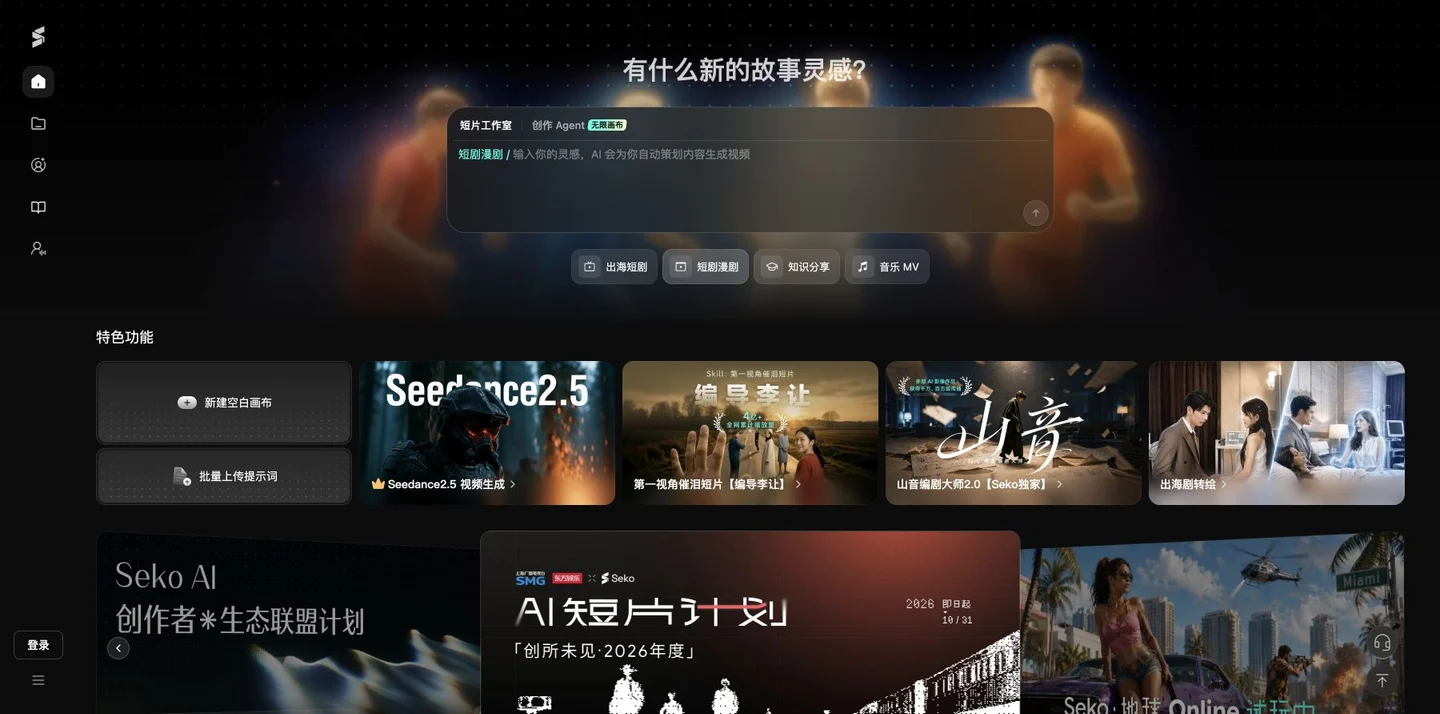
Seko draws creative inspiration from storytelling, with its homepage featuring separate sections for Short‑Form Studio, Creative Agents, and the Infinite Canvas. Users can choose a starting point—such as a short drama, manga‑style series, knowledge‑sharing content, or a music video—and then organize story‑related tasks and video‑generation workflows, making it ideal for creators who need to turn their ideas into continuous visual content.
The official portal also includes options to create new blank canvases, batch‑upload prompts, and access a library of avatars and digital‑human videos. The works section is organized into categories such as curated canvases, serialized series, narrative shorts, music MVs, animations, advertisements, and tutorials, making it easier to understand the various ways content can be created; however, publicly shared examples do not necessarily mean that every account can replicate them with the same cost and results.
When using it, first define the characters, setting, shot composition, and desired style, then review the available settings and generated results in the corresponding workspace. For multi-shot content, verify character consistency, subtitles, audio, and narrative continuity segment by segment. Account permissions and task usage are based on what’s displayed in the current workspace—avoid treating public project pages as an unlimited free-service guarantee.
Key features
Story Creation: Short Film Studio and Creative Agent Entry Point.
Canvas Organization: Create a new blank canvas and upload prompts in batch.
Content Organization: Main Asset Library and Digital Human Video Portal.
Case Community: Categories for short videos, music videos, animations, advertisements, and tutorials.
Use cases and audience
Video creators and content teams who produce AI-generated short films, skits, music videos, and advertising content.
- Organize the story concept into a multi-shot short film.
- Prepare visual content for music MVs or advertisements.
- Refer to the public canvas and tutorials to learn about the creation process.
Story inspiration, prompt words, character and setting requirements, as well as the assets supported by the selected workspace.
The videos generated in the workspace and the creative assets in the canvas vary depending on the task.
How to use
- 01
First, choose your creation method by selecting Short Video, Agent, or Canvas.
- 02
Organize the story’s objectives, characters, settings, and shot requirements.
- 03
Generated after verifying the current account permissions and task settings.
- 04
Examine each shot for coherence and detail, make revisions, and save your work.
Benefits and limitations
Benefits
- Stories, canvases, and the works community are seamlessly integrated at the same creation entry point.
Limitations
- Multi-camera consistency and audio-to-text still require manual review.
- Public cases may have different available permissions depending on the account.
Official website & sources
Updated on 2026-10-24